Core Web Vitals: Understanding How Google's New Metrics Impact SEO and How to Optimize for User Experience
 Siddhi Ingale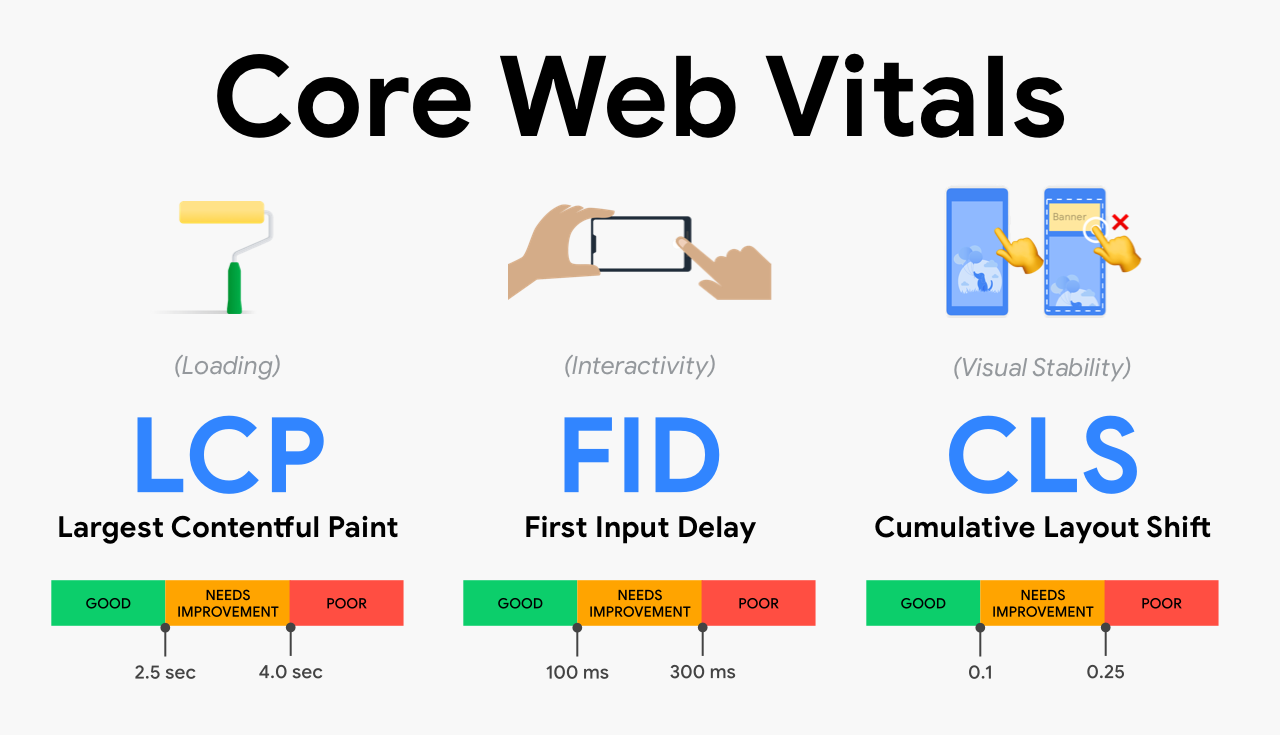
In the ever-evolving landscape of search engine optimization (SEO), staying ahead of the curve is crucial. One of the latest updates that has garnered significant attention is Google's Core Web Vitals. These metrics are designed to measure the user experience on your website and have become a pivotal factor in Google's ranking algorithm. In this blog, we will delve into what Core Web Vitals are, why they matter, and how you can optimize your website to meet these essential standards.
What Are Core Web Vitals?
Core Web Vitals are a set of specific factors that Google uses to measure the quality of user experience on web pages. These metrics focus on three key aspects of user interaction:
1. Largest Contentful Paint (LCP)
This metric measures the loading performance of a page. Specifically, it looks at the time it takes for the largest content element (such as an image or text block) to become visible within the viewport. A good LCP score is critical for ensuring that users can quickly see and interact with your content.
2. First Input Delay (FID)
FID measures interactivity by calculating the time from when a user first interacts with your page (clicking a link, tapping on a button, etc.) to when the browser is able to respond to that interaction. Lower FID values indicate that your page is more responsive and user-friendly.
3. Cumulative Layout Shift (CLS)
This metric assesses visual stability by measuring the sum of all unexpected layout shifts that occur during the entire lifespan of the page. A low CLS score ensures that users don’t experience sudden content shifts, which can be frustrating and disruptive.
Why Core Web Vitals Matter for SEO
Google’s Core Web Vitals are more than just a set of guidelines; they are a critical component of Google’s ranking algorithm. Here’s why they are essential for your SEO strategy:
1. Enhanced User Experience
The primary goal of Core Web Vitals is to enhance user experience. Google has long prioritized user experience, but with these new metrics, the focus is sharper. A good user experience reduces bounce rates, increases time on site, and ultimately improves conversion rates.
2. Improved Rankings
Websites that perform well in Core Web Vitals are more likely to rank higher in search engine results. Google’s algorithm considers these metrics as a significant ranking factor, so optimizing them can give you a competitive edge.
3. Mobile-First Indexing
With the shift to mobile-first indexing, Google primarily uses the mobile version of the content for indexing and ranking. Core Web Vitals are especially crucial for mobile users, as they ensure that mobile pages load quickly and are interactive and stable.
How to Measure Core Web Vitals
Before you can optimize for Core Web Vitals, you need to understand how your website currently performs. Several tools can help you measure these metrics effectively:
1. Google Search Console
Google Search Console offers a comprehensive overview of your Core Web Vitals performance. The “Core Web Vitals” report provides detailed insights into LCP, FID, and CLS, highlighting pages that need improvement.
2. Google PageSpeed Insights
PageSpeed Insights is a valuable tool for testing the performance of your web pages. It provides scores for LCP, FID, and CLS, along with actionable suggestions for improvement.
3. Lighthouse
Lighthouse, an open-source tool, can be run in Chrome DevTools or as a command-line tool. It audits performance, accessibility, SEO, and more, providing detailed feedback on Core Web Vitals and other performance metrics.
4. Web Vitals Extension
The Web Vitals Chrome Extension is a handy tool for real-time monitoring. It allows you to measure and track Core Web Vitals directly in the browser, providing immediate feedback on your site’s performance.
Optimizing for Core Web Vitals
Now that you understand the importance of Core Web Vitals and how to measure them, let’s explore some effective strategies for optimization:
1. Optimize Images and Media
Images and media files often account for the largest content elements on a page, affecting LCP. Here’s how to optimize them:
Use Next-Gen Formats: Convert images to modern formats like WebP or AVIF, which offer superior compression and quality.
Optimize Image Size: Compress images without sacrificing quality using tools like TinyPNG or ImageOptim.
Implement Lazy Loading: Load images only when they enter the viewport, reducing
initial page
load time. Use the loading="lazy" attribute for images and iframes.
2. Improve Server Response Time
A slow server response time can significantly impact LCP and FID. Here are some tips to enhance server performance:
Choose a Reliable Hosting Provider: Opt for a hosting service with a reputation for speed and reliability. Consider managed WordPress hosting or cloud-based solutions like Google Cloud or AWS.
Enable Caching: Use caching plugins (like WP Super Cache or W3 Total Cache) or server-side caching to store static versions of your pages, reducing load times.
Use a Content Delivery Network (CDN): CDNs distribute your content across multiple servers worldwide, reducing latency and improving load times for users globally.
3. Optimize CSS and JavaScript
Large CSS and JavaScript files can block rendering, affecting LCP and FID. Here’s how to optimize them:
Minimize CSS and JavaScript: Use tools like CSSNano or UglifyJS to minify and compress your CSS and JavaScript files.
Defer Non-Essential JavaScript: Use the defer or async
attributes
in your script tags to load non-critical JavaScript files after the main content has loaded.
Eliminate Render-Blocking Resources: Identify and remove or defer render-blocking CSS and JavaScript using tools like Critical CSS or Google’s PageSpeed Insights.
4. Enhance Mobile Performance
Mobile users are crucial for SEO, and optimizing for mobile performance is essential. Consider the following:
Use Responsive Design: Ensure your website is responsive and provides a seamless experience across all devices. Use CSS media queries to adjust layouts and styles for different screen sizes.
Optimize Touch Elements: Make sure buttons and links are easily tappable on mobile devices. Use larger hit areas and maintain adequate spacing between touch elements.
5. Minimize Layout Shifts
To improve CLS, ensure that your page’s layout is stable and predictable. Here are some strategies:
Reserve Space for Images and Ads: Use size attributes for images and iframes to reserve space before they load. This prevents layout shifts as content loads.
Avoid Dynamically Inserting Content: Minimize the use of JavaScript to dynamically insert content above the fold, which can cause unexpected shifts.
Use Font Display Swap: Implement the font-display: swap CSS
property to ensure
text remains visible while web fonts are loading, reducing layout shifts.
Monitoring and Iteration
Optimizing Core Web Vitals is an ongoing process. Regular monitoring and iteration are crucial for maintaining optimal performance. Here’s how to stay on top of your website’s Core Web Vitals:
1. Regularly Check Performance Metrics
Use tools like Google Search Console, PageSpeed Insights, and Lighthouse to monitor your Core Web Vitals performance regularly. Set up alerts for significant changes in metrics.
2. Implement Continuous Improvement
Adopt a continuous improvement approach by testing and refining your website’s performance. Conduct A/B testing, experiment with different optimization techniques, and keep abreast of the latest SEO best practices and updates.
3. Seek Expert Advice
If optimizing Core Web Vitals feels overwhelming, consider consulting with SEO professionals or hiring experts. They can provide tailored strategies, technical expertise, and ongoing support to enhance your website’s performance.
Conclusion: Prioritize Core Web Vitals for SEO Success
Core Web Vitals are not just another set of metrics; they represent a fundamental shift towards prioritizing user experience in SEO. By understanding and optimizing for LCP, FID, and CLS, you can significantly enhance your website’s performance, improve user satisfaction, and boost your rankings on Google.
Key Takeaways:
Focus on Core Web Vitals: Prioritize LCP, FID, and CLS to enhance user experience and SEO performance.
Optimize Images and Media: Use next-gen formats, compress images, and implement lazy loading.
Enhance Server and Mobile Performance: Choose reliable hosting, enable caching, and ensure a responsive design.
Minimize Layout Shifts: Reserve space for images, avoid dynamically inserting
content, and
use font-display: swap.
Monitor and Iterate: Regularly check performance metrics, implement continuous improvements, and seek expert advice when needed.
By implementing these strategies, you can not only meet but exceed Google’s Core Web Vitals standards, ensuring a fast, smooth, and engaging experience for your users. Start optimizing today, and watch your website’s performance soar to new heights!